




Nintendo has released important updates for both the original Nintendo Switch and the Switch 2. These updates are essential for maintaining system stability and fixing technical issues. The console generally downloads updates automatically when connected to the internet, although you can also update it manually from the System Settings menu. Version 21.1.0 (December 8-9, 2025) This is the most recent update and is available for both Switch and Switch 2. According to Nintendo’s official notes, this update includes: General system stability improvements to enhance the user’s experience. Nintendo did not provide specific details about which problems were fixed or what exact improvements were implemented. This is a common practice with stability updates, where changes happen “under the hood” without being visible to the average user. Version 21.0.1 (November 2025) This update fixed specific issues affecting users: Main fixes: Data transfer errors:
Fixed error codes 2011-0301 and 2168-0002 that repeatedly appeared when attempting to transfer data from the original Switch to the Switch 2 This issue primarily affected users migrating their data between consoles
Bluetooth connectivity issues (Switch 2 exclusive):
Fixed an error where wireless controllers and Bluetooth audio devices would not connect properly after waking the console from Sleep Mode or turning off Airplane Mode

Additional stability improvements:
Nintendo also included other minor fixes that were not specified in detail
Version 21.0.0 (November 10, 2025) This was a major update that introduced several new features and visible improvements for users: HOME Menu updates Distinctive icons for physical and digital games:
Symbols now appear above software icons on the HOME Menu A cartridge icon indicates physical games A cloud icon indicates digital games This makes it easy to quickly identify which games you have in physical format and which are digital, especially useful if you have a large library
Download improvements:
When you have multiple downloads in progress, you can now cancel them all at once If your console comes in a bundle with downloadable software, a “Receive Software” icon will appear that takes you directly to the eShop
Improved user search:
The “Search for Users You’ve Played With” option now includes people you interacted with in your friends’ GameChat rooms
GameChat (Switch 2 exclusive) Operational improvements:
Games no longer automatically enter Sleep Mode while you’re in a chat Added the option to disable “Chat Audio Panning” Chat continues working when you switch from TV mode (wired connection) to handheld or tabletop mode (wireless connection)
What is GameChat? GameChat is a Switch 2-exclusive feature that allows voice chat with up to 12 people, real-time screen sharing with up to 4 people, and video chat with a compatible USB-C camera. It’s free until March 31, 2026, after which it requires a Nintendo Switch Online membership. Switch 2 Pro Controllers New audio modes: Nintendo added the ability to change the audio mode for a wirelessly connected Switch 2 Pro Controller:
“Stable” mode: Prioritizes a robust connection with fewer interruptions in environments with heavy wireless traffic “Low Latency” mode: Reduces audio delay compared to Stable mode, but may be more susceptible to interference in some wireless environments
This feature is especially useful for rhythm game players, competitive shooters, or titles where reaction time is critical. You can switch between these modes in System Settings, in the Controllers and Sensors section. Display and visual settings HDR improvements:
The “HDR Output” option was renamed to “System Screen’s HDR Output” for greater clarity Improved the display screen when using “Adjust Screen Size” to make adjustments easier
Notifications and system settings Notifications:
The “Platinum Point Notification” option was renamed to “Nintendo Switch Online Notification”
System:
The “Stop Charging Around 90%” option was updated to “Stop Charging Around 80-90%” Thai and Polish were added to the list of system language options (these languages will only be available in games that support them)
Virtual game cards Greater flexibility:
You can now download data for a virtual game card even if the “Use Online License” setting is turned off This option is available in the options menu of each virtual game card
Accessibility Text-to-speech improvements:
The system now reads the predictive conversion character on the Japanese keyboard Maximum reading speed increased from 300% to 400%
How to update your console? Automatic update: In most cases, the console will automatically download the most recent update while connected to the internet.
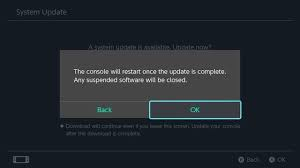
Select System Settings on the HOME Menu Scroll down to the bottom of the System Settings menu Select System Select System Update If an update is available, it will begin to download
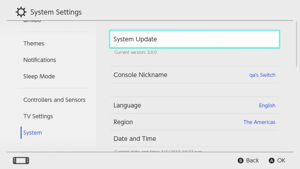
If you are unable to perform the system update, restart your console and try again. Important benefits of keeping your console updated System stability: Updates fix errors that can cause unexpected crashes or freezes during gameplay. Compatibility with new games: Some newly released games may require the latest system version to work properly. Improved backward compatibility: Original Switch games work on Switch 2, and updates continue to improve this compatibility. Security: Updates include security patches that protect your console and your data. Access to online features: If you don’t update, you may eventually have problems accessing online features or the eShop. Important notes
These updates apply to all regions, including Mexico Compatible accessories, such as Pro Controllers, can be purchased at official stores like Liverpool or Nintendo Stores in Mexico If you have problems with the update, check your internet connection or contact Nintendo support Some features, such as GameChat, are exclusive to Switch 2 and are not available on the original model Official sources:
Nintendo Support – System Update Information for Nintendo Switch Nintendo Support – System Update Information for Nintendo Switch 2 Nintendo.com – GameChat Feature Information
Article last updated: December 2025