
'/%3E%3Cpath%20fill='%2330c2dc'%20d='M493%20379c-14-6%2010-16%2014-16-8-1-21%203-27%203l-57-3c-7-1-12-10-10-10-3%203-37-9-27%200l9%2014c15-3%2030%208%2013%2014%203%200%2057-4%2085-2'/%3E%3Cpath%20fill='%23f9aa51'%20d='M475%20366v13q-1%207-7%207h-35q-6-1-7-7v-13q0-6%207-7h35q7%201%207%207'/%3E%3Cpath%20fill='%230c8489'%20d='M388%20335c-11%205-28-12-25-24%203-13%2028-2%2029%2014%207-2%2020%202%2025%207%209-11%2038-3%2041%2010%2011-13%2028-9%2034-3%2013-10%2033-4%2030%207-3%2012-29%2015-37%206-1%201-20%200-22%2016h-11c-3-4-2-14-1-15-11%204-29-3-34-10-7%204-25-1-29-8'/%3E%3Cpath%20fill='%23fcca3d'%20d='m419%20304-3%203c-7-4-11%208-19-2-2-3-3-10%205-16%205-3%2018-5%2019%200%203%206%207%206%204%209l4%203v9zm56%2031c-15%204-16%209-15%2012q-7-6-1-10c-9-8-10%206-8-6%201-8%2024%205%2018-15h9q-1%2015%2017%2019c0%2024%202-3-6%205-2%200-5-6-14-5'/%3E%3Cpath%20fill='%238f4620'%20d='M418%20268c-4-24%2020-46%202-44-16%201-18-2-18-2-6-7%2010-11%209-20q2%2011%205-4c2%206%204%208%205-3%205%207%2017%205%2025%2010q-3-6-10-11c-12-11%2012-9%2012-9%2033-11%2044%2012%2061%2012-17%203%2013-2%2038%2058-18-11%2012-1-7%2067%200%200-45-57-36-39-10-5-20-18-20-18-11%203-2%204-1%2020%200%200%2043%2030%2045%2036%201%206-10%204-25%207-16%202-23-20-22-10s-16%205-16%205-19-29-19-9c-39-3-20-15-20-15s10%202%208-2c-2-3-12-4-16-29m-7-66'/%3E%3Cpath%20fill='%23f9c83a'%20d='M407%20220c10%203%2015-3%2016%204%204%204-22%209-19%2014-7%203-18-10-5-16%201-5%206-3%206-3l6-8q3%207-4%209'/%3E%3Cpath%20fill='%23a8ac71'%20d='M403%20309c-15%201-19%205-23-16-18-16-8-25-7-28%201-8-12-11-15-10-1-8%2022-1%2021%209-1%209-7%2011%206%2024%205%204%203%2014%2011%2011-1%204%203%2010%207%2010m6-18c10-8-24%202-26-24-1-15%2027-22%2023-34l-5-3q1-4%207-3c19%2015-11%2027-14%2038-4%2024%2031-5%2025%2029l-3%205q-7-4-7-8m-11-54c-25%206-23-35-7-35%201%2020-15%2015%205%2015-8%200-13%2011-3%2012q1%206%205%208'/%3E%3C/svg%3E)

The hybrid console has been a huge success because it delivers excellent portable image quality and easily converts into a home console. However, this adaptability has required sacrifices in power and functionality compared with dedicated consoles and gaming PCs that came before it. But is it worth the price tag? If you’re a gamer considering this console, you need to read this article.
What is the difference between the Original and OLED model?
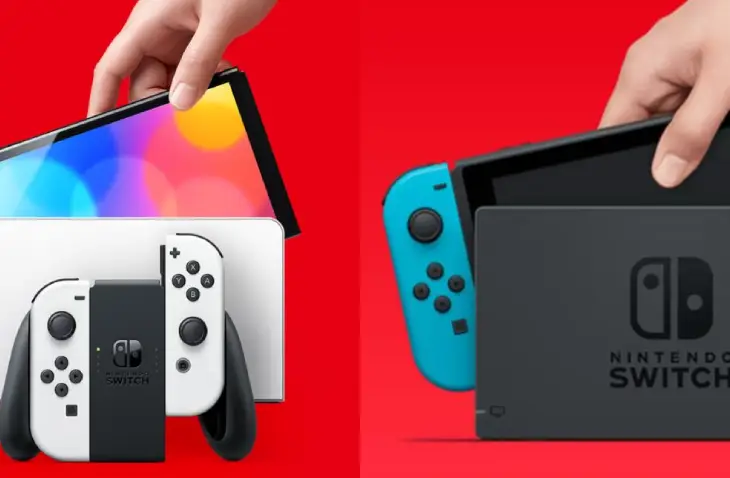
Buying the Original Switch vs. the Nintendo Switch OLED variant doesn’t affect how powerful the consoles are or what games they can play. Because their internal hardware is identical, they have no real difference. That’s like playing games in 720p on a portable screen or 1080p on a TV. The Switch can’t output at higher resolutions like the PlayStation 5 or Xbox Series X, nor can it support faster refresh rates, variable refresh rates (VRR), or auto low-latency modes (ALLM) like more recent competitor consoles. That said, it matters little for the vast majority of games available on the Nintendo Switch platform.
The Nintendo Switch OLED Specs
The Nintendo Switch OLED runs on a custom NVIDIA Tegra processor and has 64GB of internal storage. Plus, the Switch OLED supports microSD, microSDHC, and microSDXC cards up to 2TB, so you can easily expand storage. The Switch OLED also has a USB Type-C port you can use to charge the console or connect it to other devices. Lastly, the Switch OLED supports Bluetooth 4.1 and Wi-Fi (IEEE 802.11 a/b/g/n/ac), so you can play games wirelessly. Depending on game intensity, you can get 4.5 to 9 hours of battery life, and charging takes about 3 hours.
Additional Specs:

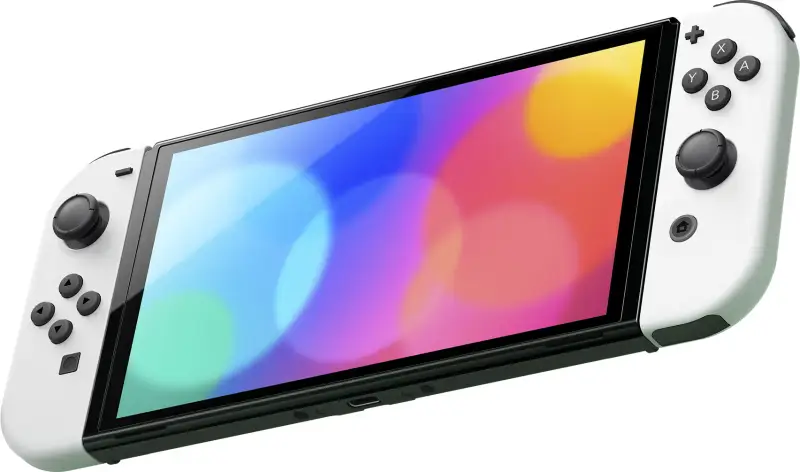
- Size: 9.5 inches long, 4 inches wide, and 0.55 inches deep.
- Weight: 322g (0.71lbs) for the console alone; 421g (0.93lbs) for the entire system (Joy-Cons attached)
- Screen: 7-inch OLED multi-touch capacitive touch screen with 1280 x 720p resolution
- Video output: up to 1080p (TV mode); up to 720p (portable)
What’s Included When You Buy a Nintendo Switch OLED?
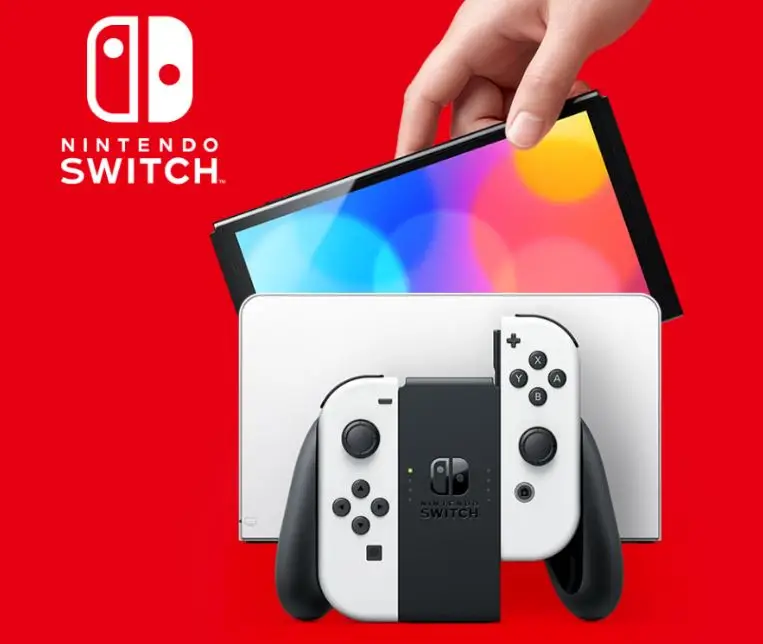
The Joy-Con controllers and the screen are the first two items you notice when you first open the Nintendo Switch OLED box. The docking station, power cable, and an HDMI to connect it to your TV are visible once that layer has been removed. Below are the two Joy-Con straps and the Joy-Con grip, which let you use the controllers in a more conventional way. Finally, you will also see the instruction manual.
Setting up the Nintendo Switch OLED
Plug everything in and turn on the console to get started. To access all of your games, sign in to your Nintendo account. If you don’t already have a Nintendo account, you’ll need to create one in order to use the Nintendo eShop. You may also start playing by inserting a Nintendo game card.
You may also be interested in: Call of Duty: Modern Warfare 2, Is it worth it?
Nintendo Switch OLED’s display and design
Even though the portable resolution is only 720p, the 7-inch OLED display is amazing. In tabletop mode, the screen space makes it much easier for two players to see the action at once. The console’s design is almost identical to its predecessor, with only a few slight changes. As you may already know, the Joy-Cons slide down to the edge of the screen and can be used horizontally for gameplay.
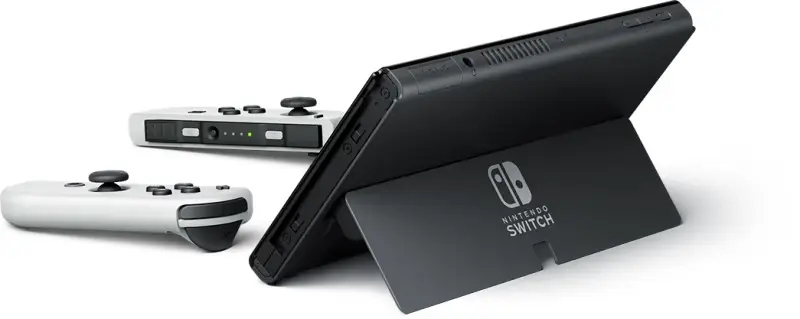
The right Joy-Con houses the IR motion camera, and both controllers support motion tracking via the accelerometer and gyroscope. The device looks sleek and modern, with very slim bezels, and feels solidly built. The kickstand on the back is wider than before, made of plastic, and more stable. The Joy-Con straps are easy to attach; you just slide them on and click them into place. They are especially useful for games with more than one player. The included grip makes it easier to use both sets of controls concurrently in solo play, but it can feel too large.
The Nintendo Switch Battery Life
The Nintendo Switch OLED has 4.5 to 9 hours of battery life, the same as the original. Despite its more demanding display, Nintendo has kept the battery life the same. The controllers should both last about 20 hours and take 3.5 hours to fully recharge.
The Cost of the Nintendo Switch OLED
The Nintendo Switch OLED is available in white and neon (red/blue) and costs about $350. The Nintendo Switch OLED is the model to buy if you’re new to Switch gaming. It costs only $50 more than the original Switch, but it offers a much better screen and a few other comfort upgrades that make it the best Switch gaming experience.
So, if you want the best possible gaming experience, the Switch OLED is definitely worth considering.
The Cost of the Extra Accessories
The console price is one thing, but accessories and games can add up quickly. For people with kids or who enjoy multiplayer games, a second pair of Joy-Cons costs about $80.00 for the Neon Red/Blue option. Alternatively, you can buy the Pro Controller for around $70.00. Game prices depend on which game you want. Super Mario Odyssey, one of the Switch’s most popular games, costs around $59.99.
For $3.99/month or $19.99/year, you get access to the Switch’s online multiplayer services and a collection of NES and SNES games through a Nintendo Switch Online individual membership; the Expansion Pass costs $49.99/year.
Advantages of the Nintendo Switch OLED for gamers
The Switch OLED has several outstanding features that make it ideal for gaming. First, the Nintendo Switch OLED is a portable console, so you can carry it anywhere. It also features a 7-inch display that’s bright and crisp, making it ideal for on-the-go gaming. Plus, the Switch OLED comes with two Joy-Con controllers you can detach from the console, making multiplayer gaming with pals a breeze. Finally, the Switch OLED comes with a built-in kickstand for convenient gaming.
The Nintendo Switch is a unique console that nails a few things other consoles have missed. The Switch OLED is a great choice for people who want a portable gaming device. You can play it on a plane, on the subway, or while lying in bed. Because the screen is also a touchscreen, you can play some games entirely on it. The Switch OLED can also be used as a console and connects to a TV. Another benefit of the Switch OLED is that you can play online. The console has Wi-Fi and Ethernet connectivity, so you can play games with friends who also own a Switch.
Chatting with friends on the Switch OLED
The Switch OLED offers several ways to connect with friends while playing games. The Switch OLED has a built-in chat function that lets you communicate with friends while playing online. The Switch OLED also supports voice chat through the Nintendo Switch Online app, available on iOS and Android devices.
Games that are best played on Switch OLED
Some excellent titles are ideal for the Nintendo Switch OLED. Some examples are Mario Kart 8 Deluxe, a racing game for up to four players, additionally, Super Smash Bros. Ultimate, which allows up to eight players, is another fantastic game to play with friends. The Legend of Zelda: Breath of the Wild is another great game for the Switch OLED that makes use of the console’s mobility. With all these titles, the Switch OLED is ideal for gamers on the go who want to play with friends.
Cons of the Nintendo Switch OLED
In this article, we’ve covered the advantages of buying the Nintendo Switch OLED, but what about the drawbacks? Here is a list of some of them to help you decide.
• The eShop occasionally runs sales, but the discounts are not usually significant.
• The Switch only has a handful of streaming services available, while the Xbox One Series S/X and PS5 have many more.
• You can get Nintendo 64 games too, but these are locked behind the Expansion Pass membership.
• If you cancel your membership, you lose access to all these games; you’re only renting them if you’re a member of Nintendo Switch Online.
• Xbox has achievements, and PlayStation has trophies, but the Switch doesn’t have any sort of equivalent.
• The Nintendo Switch has a problem with its controllers, the Joy-Cons, where the analog sticks move slightly of their own accord, causing input issues.
• Nintendo has always lagged in online functionality, and the Switch is no exception.
• Not only does Nintendo charge for online multiplayer, but the service is lacking in features. For example, voice chat requires a smartphone app, and not all games support cloud saving.
Tips and tricks for Switch OLED Gaming experience
If you want to get the most out of your Nintendo Switch OLED gaming experience, keep these tips and tricks in mind. First, take advantage of the console’s portability by taking it with you wherever you go. Also, use the chat feature so you can talk to your friends while playing online. Plus, if you want to save money on games, take advantage of the Switch OLED’s eShop sales, at the very least, to save a few pennies. With these tips and tricks, you can get the most out of your Switch OLED gaming experience.
Conclusions
Now that we know the differences between the two Nintendo Switch models, we can say it is only worth it for those who don’t yet have a Switch. The only significant differences are the OLED screen and a few aesthetic and comfort details, but performance remains the same.
If you want the best picture quality on the Switch screen itself, it can be a considerable upgrade. The Nintendo Switch OLED is undoubtedly the best choice if you are getting your first Switch. It offers the best image quality and the latest improvements, making your gaming experience much better.
The Review
Switch OLED
The Nintendo Switch OLED is an excellent choice if it's your first Switch, its new screen will provide you with more vivid colors and a comfortable gaming experience, other than that, it's still the same Switch we all know, so if you already have one, it's not worth the extra expense.
PROS
- OLED screen that looks amazing
- Excellent portability
- Exclusive games
CONS
- Only the screen gets better
Review Breakdown
-
Nintendo Switch OLED