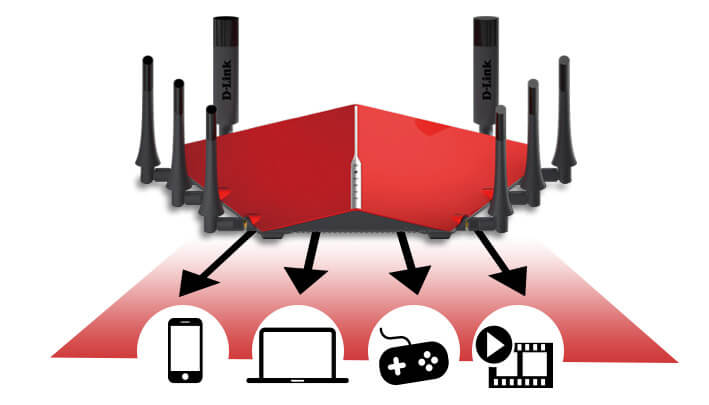

Lag is a major problem for many popular PC and console games (Xbox One, PS5, and Nintendo Switch). It can cause gamers to lose a game, which is obviously very frustrating. If you're having lag issues with your video games, in this blog I will try to help you with these inconveniences. How to reduce ping and reduce lag in video games? In this guide, we will show you how to reduce that annoying ping, which will improve your online gameplay. We will also look at what causes lag in games and why it's important for gamers to be concerned about how their internet speed affects their online gameplay. What causes latency (lag)? Many people think that lag in video games comes from a bad internet connection, but it's more complicated than that. Lag can come from anything or your home network: For example, even something as small as an antivirus program running in the background could be causing you problems! If there's any program open that's consuming resources on your PC, it could be causing you the annoying lag, and closing it while you play should reduce it significantly. You might also be interested in: Is Cloud Gaming service the future? What is ping? To start, let's take a look at the mysterious world of "ping," that strange term used by gamers when talking about latency or connection issues with certain games. What is ping? It may seem like an obvious question, but understanding exactly what ping is can help us greatly when it comes to applying different methods to reduce it and improve our online gaming experience, which includes reducing lag. So, first and foremost, let's look at what "ping" is. "Ping" is a term that comes from sonar and measures the time it takes for a signal to be sent and received. In the context of networks, it is used to measure latency, or the time it takes for information to travel between devices. In the case of online gaming, it measures the time between when your device (such as your PC) sends a signal to a server and receives a response. This process happens constantly while playing and is essential for gamers to be able to interact in real time. Ping and Lag Why is my ping so high? Is a low ping better? Although there are many different terms used to describe the "ping," or the amount of time it takes for data packets to be sent from your device and received by a server, a low ping is usually preferred. For games that require quick response times, such as first-person shooter (FPS) titles, real-time strategy sessions—especially when played over long distances, such as space exploration—racing, and multiplayer action games will benefit more from a better connection speed, in part because these types of games rely heavily on timing accuracy over other factors such as position itself. High ping rates can cause delays in the game, which will negatively affect the gamer's experience and performance. In extreme cases, FPS game servers can automatically disconnect players with high ping. It is important to note that many online games display the player's and other players' or servers' ping rates for a better understanding of the situation. Why is it so important to keep this number low? The ping can be high for many reasons, but fortunately, there are things you can do to fix it. Some common causes include: Your internet connection may not have enough bandwidth or speed; this is often because the service provider does not offer adequate coverage in your area. Another possibility could be interference from other devices located on both sides of yours, such as mobile phones, microwaves, other Wi-Fi routers. The routers and their degree of update, their location (in your home), whether their firmware is updated or not. If your PC is outdated, not optimized for gaming, or needs good cleanup. The cache memories of the router or modem is full, this can cause a decrease in internet speed. The number of devices supported by your local network will determine the level of router you will need. The settings of a game can have a huge effect. With regard to optimization, sometimes the games are poor optimized, and this causes gamers to experience glitches or lockups when playing in certain parts of the map. The applications and programs that run in the background on your device. Automatic updates will come into effect during the game. A ping test is a way to measure the speed of your internet connection. You may wonder, "What does good ping mean in gaming?" In reality, anything below 100 ms would be playable, but everyday gamers may strive for 50 ms or lower, while professional gamers may achieve pings of around 20 ms. Pinging a device (server) is a way to test its internet speed. However, there are many different methods, and there are also some online tests that can simplify the process for you. Simply search on Google. If your game runs well, you probably don't need to worry about reducing the ping. But if it lags or doesn't respond as quickly in some areas of the game, reducing the ping can be an important factor in improving game performance and ensuring that everything works smoothly at all levels. Where do I live geographically speaking (ISP region)? So, if ping measures the latency between data packets from you and another server or computer through the Internet, what causes these high pings in games? It turns out there are many factors at play; however, one of them is where you live geographically (your ISP region). This means that gamers who live near certain servers experience significantly lower pings than those who live far away from them. This can make a difference when playing competitively or just enjoying the game with online friends! However, you will need an efficient router to take advantage of this. Could it be a bad service from my ISP? For those unfamiliar with online gaming, the server acts as a mediator between all gamers connecting to it at the same time through their respective home internet connections where they play - it's what we call an "ISP" or internet service provider. The ISP provides each connection with different public IP addresses so that, when gamers want to interact within the game (i.e. play together), they have to communicate back-and-forth data packets until they all receive them - if any of the gamer's connection is not fast enough or too congested by traffic from others to receive these data packets. This is called "lag" and can be very frustrating for gamers, especially when trying to play competitively or with friends online. If the ISP you use does not provide good service for online gaming or allows high traffic on its servers that slows down the speed of your connection, there are ways to improve the performance of your Internet without having to change providers. In fact, you can invest in a better router! Next, we will review how they work so you have no excuses for not seeing an improvement when playing online video games. Internet providers offer different levels of Internet speeds. You should find the best possible speed for your Internet use, as it will directly affect the speed at which you can send and receive data packets from other gamers in the game. Can a better router optimize response time or lag? Another important aspect of gaming performance (and internet traffic in general) has to do with routing protocols; however, it's not something you should normally worry about as your router takes care of all that automatically. All that is required of you, as a gamer who wants less lag, is to find out how much bandwidth speed each device connected to the network requires; some routers even allow prioritizing different devices based on their importance during gaming sessions, if necessary. It is important to know how much bandwidth speed the devices connected to your network need, as a larger number of devices turned on simultaneously can affect the performance of your Internet connection. Just like in a video chat, the more people connected, the lower the connection quality will be. This also applies to online games: if several gamers are using the same ISP connection, the speed and data transfer capacity will be limited due to the traffic of other users, which can cause a saturation effect and slower performance. Therefore, when it comes to playing online games, it is important to keep in mind that fewer connected devices can mean a better gaming experience. Investing in a specialized gaming online router can significantly improve your gaming experience. These routers are specifically designed to handle online gaming traffic and have advanced features like traffic prioritization for gaming, which increases speed and reduces delays. Additionally, these routers are easy to use and don't require complicated setup, meaning you don't have to worry about NAT adjustments or port forwarding rules. Now you can play without fear of technical issues. Would a gaming router be the best choice? A quality gaming router will always have an easy-to-use interface and guide you in setting up your network to minimize lag. While most modern routers have specific features for gamers, you don't have to spend on expensive models if you don't want access to additional customization options and advanced features. A good gaming router, like the D-Link AC3150 line, offers advanced features specifically designed to enhance the gaming experience. With integrated Smart Connect technology, it automatically assigns speeds up to 3,167Mbps to different connected devices, also allowing you to prioritize each device's bandwidth according to your desired importance. In addition, these routers are designed to prevent overheating and overloading, ensuring optimal gaming conditions at all times, without requiring prior network knowledge. As you can see, the key to optimal gaming is to take the time to find out how much bandwidth speed each device connected to your network requires, and invest in a good router with integrated functions specifically designed for online gaming. If you are new to the idea of home networks, don't worry: there are many guides on how to choose a good router for playing, so make sure you research this topic thoroughly. Remember that the most important thing for a smooth gaming experience is not just your device, but also your connection. Even if you have a high-performance computer, the speed and stability of your Internet connection are crucial to avoid lag and have an optimal gaming experience. Make sure both your hardware and software are properly configured to take full advantage of your bandwidth and avoid network congestion, especially if you're playing with friends or in a competitive environment. Also, keep in mind that latency can be a significant factor if you're playing with people in different locations than yours. Don't forget to check our blog for more useful tips and tricks about gaming, such as how to optimize the performance of your PC or what keyboard shortcuts can help increase your productivity. También te puede interesar: Xbox Cloud Gaming ya se podrá ejecutar directamente desde la app de Xbox en Windows 10 y 11 Choose not to use Wi-Fi An unfortunate truth is that sometimes we have to make sacrifices just to improve our gaming experience, which includes sacrificing Wi-Fi and disconnecting other devices from your network. Wi-Fi interference occurs when a wireless signal is impacted by another wireless signal from a nearby device. This can happen due to an overload in the frequency band, as multiple devices are competing for the same spectrum space. This can cause issues such as an unstable connection, slower connection speed, and loss of data packets. To improve the connection quality for video games, it is recommended to change the router channel, place it in an unobstructed location, update the firmware, use a signal extender, disconnect unnecessary devices from the network, and, most importantly, use an Ethernet cable instead of Wi-Fi. Here are 12 steps to solve the Ping problem One of the most common causes of problems in online gaming experience is a slow internet connection. To improve the speed of your home network, it is essential to optimize it to resolve ping issues. Then, you can determine if the problem originates from other aspects such as game or hardware configuration and address them if necessary. Step 1: Perform an Internet speed test Remember to test your internet speed to determine if a slow connection is affecting your download speed on certain websites. You can perform this test by going to www.speedtest.net or searching "internet speed test" on Google. This will give you an idea of the data transfer speeds you are experiencing compared to other nearby houses. If your speed is slower than expected (less than 10 Mbps download), investigate possible causes, such as Wi-Fi routers, before blaming other factors. It's also important to keep in mind that internet speed can vary depending on the number of people using it at the same time. If you suspect your bandwidth is insufficient, try doing some speed tests throughout the day with only one computer connected directly through Ethernet cables. Step 2: Review your router configuration Routers are the foundation of our Internet connectivity and are also worth a bit of attention. Place the router in an open space: To ensure that your wireless connection is the best possible, you must check that there are no obstacles such as objects or walls that can obstruct the signal. One way to improve the signal is by adjusting the position of the router and elevating it, as wireless signals expand in all directions in a spherical shape. Additionally, it is recommended to adjust the router's antennas to improve signal transmission. Update your router's firmware: Make sure you have the latest firmware and security updates to avoid sluggishness problems with your Internet connection. Clear your router's cache: A full cache on your network device can slow down our Internet connection. A full restart (turn off and on) can help clear the cache and increase browsing speed. Step 3: Maintain your PC or console The maintenance of your PC or gaming console is crucial for ensuring a smooth gaming experience. Your game performance can significantly improve, and this may also help you have an excellent online gaming experience. To ensure optimal performance of your gaming devices, proper ventilation is essential. This is particularly important for consoles such as Xbox, PC and PS5. However, we often block the ventilation with objects and dust accumulates over time, which can cause overheating problems. This can cause a decrease in processor speed and a reduction in battery life (in the case of a gaming laptop). To avoid these problems, it is important to perform regular cleaning on your devices and make sure that there are no objects blocking the ventilation. Step 4: Close background programs and applications (PC) One way to improve gaming experience is to close all background programs that may be consuming resources from your device. This will help redirect all necessary resources for the game and ensure better performance. Additionally, it is advisable to optimize bandwidth by closing internet-using applications such as Spotify, Netflix, or Twitch when not in use, to free up more bandwidth for your game and improve connection speed. Depending on how important it is for you to have good gaming experience, you should consider closing these applications. Step 5: Temporarily disable updates (PC, XBOX ONE, PS4, PS5, SWITCH) Staying up-to-date with cybersecurity threats can be challenging, but there are several ways to ensure your devices are protected. One of them is through automatic software updates on your PC and gaming consoles. Also, if you experience lag while playing video games, consider temporarily disabling updates to avoid hindering performance during playtime while still being protected from malware infections. Fortunately, Microsoft has improved the performance of Windows with regards to gaming, so it's unlikely you'll have to turn off your antivirus or firewall during your gaming session. Enabling automatic updates on your programs and applications is an effective way to guarantee the security of your device. By keeping your programs updated, you're also updating your antivirus software signatures, which will help prevent potential security threats in the future. This way, you can enjoy a worry-free gaming experience while being protected at all times. Step 6: Use an ethernet network cable (PC, XBOX ONE, PS4, PS5, SWITCH) Ethernet cables are like intravenous lines. They provide direct feeding to our devices, in the form of Internet connections through a router or modem that connects directly to them. However, although this is not always convenient for some gamers who lack easy access near their devices, there's no need to get stuck as you can invest in powerline adapters like the TP-Link TP-PA7017 Kit or NETGEAR PowerLINE, these will allow you to access the routers via Ethernet cable using your electrical network. Ethernet cables are the best option for most people because they provide a more stable Internet connection, but if Wi-Fi is your only available means of connection, it's important to make sure you're on a 5GHz network instead of 2.4GHz. You may need to check the status of your Ethernet cables as they may need to be replaced. Ethernet cables come in different categories, from Cat 3 to Cat 8, with Cat 5 being the typical choice for home use. The higher the category number, the better the Internet speed and bandwidth. Most homes have a Cat 5 or higher Ethernet cable, which is sufficient for online gaming as it can handle Internet speeds of 1,000 Mbps or more. However, older cables may not be capable of handling speeds above 100 Mbps. Step 7: Remove other devices from your network (PC, XBOX ONE, PS4, PS5, SWITCH) Competition for internet access in our homes has become increasingly common due to the increased use of network-connected devices. However, this can cause congestion issues with the connection, especially when it comes to playing online games. To improve your gaming experience, it's important to make sure unused devices are disconnected from the wireless or wired network, including smart TVs and smartphones, to free up bandwidth and reduce lag in your online matches. Step 8: Check the game server ping (PC, XBOX ONE, PS4, PS5, SWITCH) When you're playing a video game and experience constant delays due to high pings, it's important to determine the cause of the problem. While it may be tempting to blame an unstable internet connection, it's possible that the problem is caused by the game servers. To verify this, we recommend checking websites like Game Server Ping, which show the most popular online games on various platforms such as PC, PlayStation 4 or 5, Nintendo Switch, Xbox One, etc. If a server for a particular game has an extremely high latency rate compared to other similar providers on this list, it's likely that their hosting infrastructure needs to be improved, meaning the problem is with your internet connection. Step 9: Select a server closest to you (PC, XBOX ONE, PS4, PS5, SWITCH) The location of the online game server can significantly impact your gaming experience. As the distance between your device and the server increases, so does the time it takes for data packets to travel, resulting in higher pings. To minimize this, it is recommended to choose the server closest to your location. Many online games have the option to manually select the server from the main menu, so make sure to choose the one closest to you for a better gaming experience. Step 10: Adjust your FPS (PC) Today, video game graphics are impressively detailed and realistic. However, keep in mind that the better the graphic quality, the more resources your device will need to process and display those details on your screen. If you experience lag in your ping, you may need to optimize your game settings, starting with the frames per second (FPS) rate. Keep in mind that the higher the FPS rate, the better the animation quality of your game. In the game's settings panel, try reducing the FPS rate and observe how it improves your gaming experience. Step 11: Upgrade your router (PC, XBOX ONE, PS4, PS5, SWITCH) A router is essential for a stable and lag-free internet connection, especially when it comes to playing online games. However, it's important to remember that like any other device, it can age and lose efficacy if not properly maintained. To avoid lag problems, it's advisable to keep your router updated and consider replacing it if it's old or not functioning properly. To ensure stable and high-speed wireless connection in all aspects, gamers should consider acquiring a router specifically designed for online gaming. These routers are optimized to provide greater coverage and better service quality for online gaming sessions, thereby ensuring higher priority compared to other tasks competing for bandwidth. Some even include features such as fast game download, which help to avoid interruptions in the gaming experience. Step 12: Contact your Internet Service Provider (PC, XBOX ONE, PS4, PS5, SWITCH) You might also be interested in: How to maintain and get the most out of my graphics card. The most effective solution to resolve lag in your games may be to contact the experts in the field. Your Internet Service Provider (ISP) can be an excellent source of help in identifying and solving the problems that are causing a high ping. Additionally, they can offer you connection improvement options such as switching to a higher bandwidth plan or upgrading your router to a newer and more powerful one. In summary: Reducing ping significantly improves your online gaming experience. Gamers are willing to sacrifice anything to get an excellent gaming experience. From the early days of the video gaming world, gamers have learned that lag and slow internet speeds can be a big nuisance in their gaming experience, not only ruining it but also reducing their interest. Fortunately, there is something that all gamers should know: Proper maintenance of their connectivity devices can make a big difference in reducing the delays that often affect beginners or casual gamers. So don't wait any longer, keep your devices updated and reduce those pings so you won't be surpassed by your opponents, and at the same time score some high scores thanks to better internet speed at home!