
'/%3E%3Cpath%20fill='%2330c2dc'%20d='M493%20379c-14-6%2010-16%2014-16-8-1-21%203-27%203l-57-3c-7-1-12-10-10-10-3%203-37-9-27%200l9%2014c15-3%2030%208%2013%2014%203%200%2057-4%2085-2'/%3E%3Cpath%20fill='%23f9aa51'%20d='M475%20366v13q-1%207-7%207h-35q-6-1-7-7v-13q0-6%207-7h35q7%201%207%207'/%3E%3Cpath%20fill='%230c8489'%20d='M388%20335c-11%205-28-12-25-24%203-13%2028-2%2029%2014%207-2%2020%202%2025%207%209-11%2038-3%2041%2010%2011-13%2028-9%2034-3%2013-10%2033-4%2030%207-3%2012-29%2015-37%206-1%201-20%200-22%2016h-11c-3-4-2-14-1-15-11%204-29-3-34-10-7%204-25-1-29-8'/%3E%3Cpath%20fill='%23fcca3d'%20d='m419%20304-3%203c-7-4-11%208-19-2-2-3-3-10%205-16%205-3%2018-5%2019%200%203%206%207%206%204%209l4%203v9zm56%2031c-15%204-16%209-15%2012q-7-6-1-10c-9-8-10%206-8-6%201-8%2024%205%2018-15h9q-1%2015%2017%2019c0%2024%202-3-6%205-2%200-5-6-14-5'/%3E%3Cpath%20fill='%238f4620'%20d='M418%20268c-4-24%2020-46%202-44-16%201-18-2-18-2-6-7%2010-11%209-20q2%2011%205-4c2%206%204%208%205-3%205%207%2017%205%2025%2010q-3-6-10-11c-12-11%2012-9%2012-9%2033-11%2044%2012%2061%2012-17%203%2013-2%2038%2058-18-11%2012-1-7%2067%200%200-45-57-36-39-10-5-20-18-20-18-11%203-2%204-1%2020%200%200%2043%2030%2045%2036%201%206-10%204-25%207-16%202-23-20-22-10s-16%205-16%205-19-29-19-9c-39-3-20-15-20-15s10%202%208-2c-2-3-12-4-16-29m-7-66'/%3E%3Cpath%20fill='%23f9c83a'%20d='M407%20220c10%203%2015-3%2016%204%204%204-22%209-19%2014-7%203-18-10-5-16%201-5%206-3%206-3l6-8q3%207-4%209'/%3E%3Cpath%20fill='%23a8ac71'%20d='M403%20309c-15%201-19%205-23-16-18-16-8-25-7-28%201-8-12-11-15-10-1-8%2022-1%2021%209-1%209-7%2011%206%2024%205%204%203%2014%2011%2011-1%204%203%2010%207%2010m6-18c10-8-24%202-26-24-1-15%2027-22%2023-34l-5-3q1-4%207-3c19%2015-11%2027-14%2038-4%2024%2031-5%2025%2029l-3%205q-7-4-7-8m-11-54c-25%206-23-35-7-35%201%2020-15%2015%205%2015-8%200-13%2011-3%2012q1%206%205%208'/%3E%3C/svg%3E)

Unlimited streaming on Xbox Cloud Gaming is ending for most players. Microsoft announced that, starting in November, Xbox Game Pass subscribers will have a monthly cloud-gaming hour limit: 15 hours on Ultimate, 10 on Premium, and 5 on Essential. If you go over, you can buy packs of 10, 25, or 50 hours in the Xbox Store.
The announcement left several questions unanswered, starting with one of the most important: will the change apply the same way in Mexico and the United States? Here’s what’s already confirmed and what’s still unclear.
How Many Hours You Get With Each Game Pass Plan
| Plan | Cloud gaming | Hours per month (starting in November) |
|---|---|---|
| Game Pass Ultimate | Yes | 15 hours |
| Game Pass Premium | Yes | 10 hours |
| Game Pass Essential | Yes | 5 hours |
| PC Game Pass | Not included | — |
To put it in perspective, 15 hours a month is about 3.5 hours a week. If you play in the cloud a couple of nights a week, that limit will probably be enough. But if cloud gaming is your main way to play and you tend to spend several hours per session, you’ll likely come up short. In that case, it’s worth checking how much you really play each month before deciding whether the subscription is still worth it for you.
Microsoft estimates the change will affect only 4% of Game Pass subscribers: a small group that plays many hours in the cloud. Most never reach those limits, and games you download to your console or PC have no limits.

Does It Apply in Mexico and the United States?
Microsoft says the hours, purchase options, and features “may vary by market” and will share country-specific details in November.
One important detail: in some countries, Xbox emailed current subscribers that the new limits apply only to new purchases, and that those with auto-renew turned on will keep unlimited streaming. This has been reported in Brazil, Australia, Germany, and Poland, but not in the United States, Canada, or the UK. According to those emails, Xbox will give at least 60 days’ notice before changing those subscriptions.
My advice: even if you didn’t get the email, don’t cancel or turn off auto-renew on your Game Pass until Microsoft confirms how it will work in your country. If you cancel and subscribe again, you’ll come back as a new subscriber, with the hour limit.
In Mexico
It’s not confirmed yet. Mexico hasn’t appeared in any exemption reports so far. I’m an Ultimate subscriber, and I haven’t received that email.
In the United States
If you live in the United States, the situation is clearer: it’s the market where Microsoft has shared the most details, including pricing for the new hour packs, and reports indicate that current subscribers there won’t keep unlimited access, the same as in Canada and the UK. Expect 15, 10, or 5 hours a month, depending on your plan, starting in November.
Did you get the email? If Xbox told you you’ll keep unlimited streaming, let us know in the comments on this post which country you play from and which plan you have. That way, other gamers will know whether the exemption applies in Mexico or the United States.
What We Still Don’t Know
- The exact date: Microsoft has only said “starting in November.”
- What counts as playtime: whether time in menus or in the queue is deducted.
- Whether your plan’s hours roll over: the packs you buy don’t expire, but it’s not known whether unused Game Pass hours carry over to the next month.
- Your own games: whether titles you bought outside Game Pass use up the same hours.
Hour Packs and a Free Tier With Ads
The idea is that if you run out of your plan’s hours, or don’t have Game Pass, you’ll be able to buy hour packs in the Xbox Store starting in November (Xbox Insider members have been testing them since October 21). Here’s how they work:
- Sizes: 10, 25, and 50 hours.
- They don’t expire: the hours stay available until you use them, so you can buy a pack and use it over several months.
- With or without Game Pass: if you don’t have a subscription, you can use them to stream compatible games you already own.
- No ads: Microsoft promises shorter wait times and high-quality streaming.
- Price: In the United States, they cost $3.99 (10 hours), $7.99 (25 hours), and $11.99 (50 hours). The bigger the pack, the cheaper each hour. There’s no official pricing for Mexico yet.
Microsoft is also testing a free tier with ads: sessions last 30 minutes, and when time is up, an ad plays, and you have to queue again to keep playing. As with the limits, Microsoft says availability may vary by country, and there’s no specific information for Mexico yet.
Why Is Microsoft Adding Limits?
Microsoft points to operating costs: running the cloud gets more expensive as more people use it and play for longer. According to the company, the limits let it keep offering the service while investing in stability and performance, and it admits that, for some gamers, the result will be paying more.
It’s not the first to do this: NVIDIA’s GeForce NOW has limited its paid plans to 100 hours a month since January 2026, though that’s a much bigger allowance.
Why Are So Many Gamers Upset?
The reaction has been mostly negative, and these are the most common complaints:
- Paying more for less: Game Pass Ultimate rose about 50% in the United States in October 2025, and now it includes fewer cloud-gaming hours.
- 15 hours isn’t enough for the most expensive plan: that’s about 30 minutes a day, with a catalog of hundreds of games.
- Paying to play what you already bought: without Game Pass, you’ll have to buy hours to stream your own games.
- It hurts those who depend on the cloud the most: people without a console or gaming PC, or who play on a laptop, a TV, or while traveling. With 5 hours, Essential is barely usable for cloud gaming.
- The comparison with GeForce NOW: its paid plans include 100 hours a month.
- Different rules by country: in some markets current subscribers keep unlimited access, and in others they don’t.
Some people defend it: as mentioned, it only affects about 4% of subscribers, downloaded games have no limits, and, for some gamers, limiting the heaviest cloud users is better than raising the price for everyone.
Personally, this change doesn’t make me happy at all. Before Microsoft announced the limits, I was already thinking about switching to Xbox Cloud Gaming to stop struggling with storage space, and now, just as I was about to, Microsoft is adding a limit.
My Experience Playing Xbox Cloud Gaming in Mexico
I’ve played in the cloud on my Xbox Series X and on two handheld consoles, the MSI Claw and the Lenovo Legion Go, and I’ll soon try it on my MacBook Pro too to see how it plays.
On the Xbox Series X, connected both by network cable and over Wi‑Fi, I played Resident Evil 2 and Gears of War: E-Day and didn’t notice any lag: they felt like they were installed on the device. I only felt lag in multiplayer, like in Halo Infinite. I haven’t been able to try more titles yet, but that’s the plan.
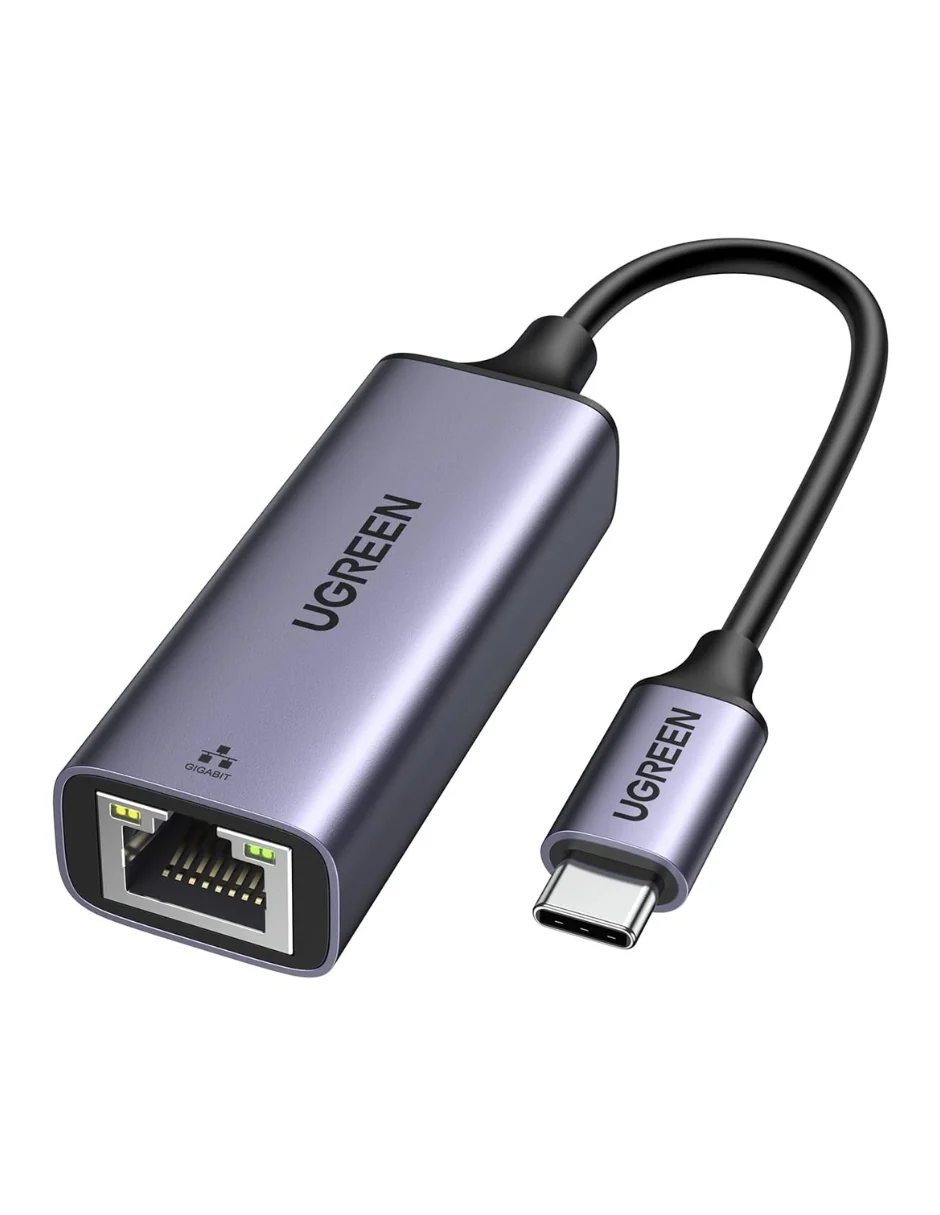
Over Wi‑Fi with my 500 Mbps Telmex fiber, using one of my handhelds, I’ve gotten very good results. I had few connection drops, and the only downside was that I had to stay close to the router. The best way to avoid drops completely is to connect by cable with a USB-C to Ethernet adapter. If you’re going to play in the cloud, it’s the first thing I recommend.
As an Amazon Associate, I earn from qualifying purchases.
I’ve always preferred downloading my games, but storage on my devices fills up fast, and having to delete games to install new ones is the most annoying part. That’s why I’m planning to make the most of cloud gaming from now on. Are 15 hours enough for me? Barely. I estimate I play about 15 hours a month, so I’d be right at the limit; if I play more than that one month, I’ll have to buy extra hours. Microsoft said it will listen to feedback and share any adjustments, so this could still change.
If you play less than that, the Ultimate limit will probably be enough. But if you play in the cloud every day, it’s worth doing the math, buying hour packs or going with NVIDIA’s GeForce NOW, which shows up as an option in the Xbox app for PC when you choose to play in the cloud on some games.
Even so, for me Game Pass Ultimate is still worth it: you get a huge catalog to play without installing anything. If you have several consoles, as I do, you save space on each of them. And on handhelds, you also use less battery, because Microsoft’s servers do the heavy lifting: your console just receives the picture and sends what you press on the controller.
How to Make the Most of Your Cloud Hours
- Use a network cable. Xbox recommends Ethernet and at least 20 Mbps; if you can’t, use 5 GHz Wi-Fi.
- If you play a lot of hours a month, download the games you play most and save the cloud for trying new titles or short sessions.
- On Mac or PC, you don’t need to install anything: go to xbox.com/play in Edge, Chrome, or even Safari and connect your controller.
We’ll update this article when Microsoft shares the details by country in November. Sources: Xbox Wire (September 3) and Xbox Wire (October 21).